

What Is a Calorie Calculator?
A calorie calculator is a simple online tool that helps you estimate how many calories your body needs each day based on your personal details. These details usually include your:
- Age
- Gender
- Weight
- Height
- Activity level
Health or fitness goal (like weight loss, gain, or maintenance)
The calculator uses this information to calculate your Basal Metabolic Rate (BMR) and Total Daily Energy Expenditure (TDEE)—which together help determine how many calories you should eat per day.
In short, a calorie calculator helps you answer the question:
“How many calories should I eat each day to reach my goal?”
This tool is especially helpful if you want to:
- Lose or gain weight in a healthy way
- Maintain your current weight
- Fuel your body properly for exercise or everyday activities
It’s a great first step toward better nutrition and a healthier lifestyle.
Why Should You Use a Calorie Calculator?

Using a calorie calculator can make your health and fitness journey easier, more accurate, and more effective. Here’s why it’s worth using:
Helps You Reach Your Goals
Whether your goal is to lose weight, gain muscle, or maintain your weight, a calorie calculator shows you exactly how many calories you should eat daily to get there.
Avoids Guesswork
Instead of randomly choosing a diet or portion size, you get a personalized calorie target based on your age, gender, weight, height, and activity level.
Improves Eating Habits
Tracking calories helps you become more aware of what you eat. It encourages smarter food choices and reduces mindless snacking or overeating.
Supports Fitness Performance
For people who work out, knowing your daily calorie needs helps you fuel your body properly before and after exercise.
Helps With Long-Term Health
By staying within your ideal calorie range, you can manage your weight better and reduce the risk of chronic diseases like diabetes, heart issues, and obesity.
How Does a Calorie Calculator Work?
A calorie calculator works by estimating the number of calories your body needs each day using a few key personal details. It uses science-backed formulas to calculate your energy needs based on:
Basal Metabolic Rate (BMR)
This is the number of calories your body burns at rest—just to keep your heart beating, lungs breathing, and other vital functions going.
The calculator typically uses the Mifflin-St Jeor Equation to find your BMR:
For men:
BMR = 10 × weight (kg) + 6.25 × height (cm) – 5 × age (years) + 5
For women:
BMR = 10 × weight (kg) + 6.25 × height (cm) – 5 × age (years) – 161
Total Daily Energy Expenditure (TDEE)
This is your BMR multiplied by your activity level (how active you are during the day).
Here are the common activity multipliers:
| Activity Level | Multiplier |
|---|---|
| Sedentary (little or no exercise) | 1.2 |
| Lightly active (light exercise 1–3 days/week) | 1.375 |
| Moderately active (moderate exercise 3–5 days/week) | 1.55 |
| Very active (hard exercise 6–7 days/week) | 1.725 |
| Extra active (physical job or intense training) | 1.9 |
Adjusted for Your Goal
Once your TDEE is calculated, the tool adjusts the calorie number depending on your goal:
- To lose weight: Subtract 10–20% from TDEE
- To gain weight: Add 10–20% to TDEE
- To maintain weight: Stick with your TDEE
Example:
If your TDEE is 2,200 calories and you want to lose weight, the calculator may recommend eating around 1,800–2,000 calories per day.
What Is BMR and TDEE? (And Why They Matter)
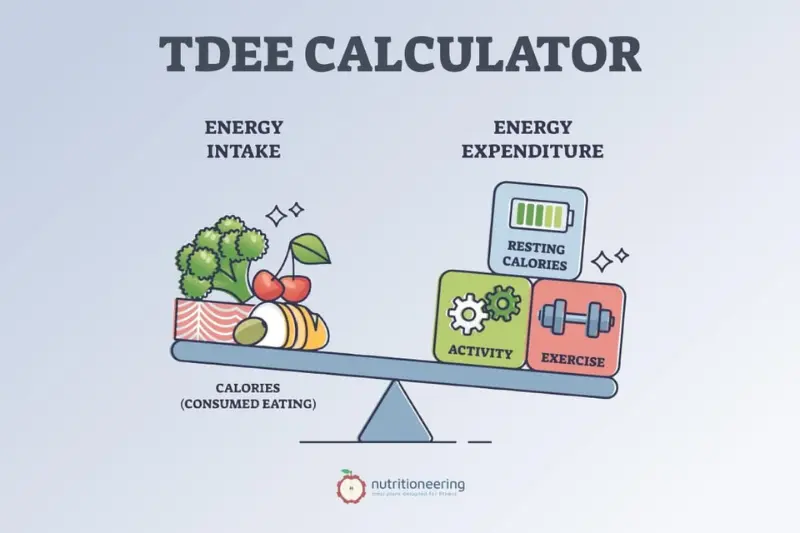
To understand how many calories you need each day, it’s important to know two key terms: BMR and TDEE. These are the foundation of any accurate calorie calculation.
What Is BMR (Basal Metabolic Rate)?
BMR is the number of calories your body needs to perform basic functions while at rest—like breathing, circulating blood, and regulating body temperature.
Think of it as the minimum fuel your body needs to survive if you were lying in bed all day.
Why it matters:
Knowing your BMR helps you avoid under-eating. If you eat fewer calories than your BMR, your body may lack the energy it needs for essential functions.
What Is TDEE (Total Daily Energy Expenditure)?
TDEE is your BMR plus the calories burned through daily activities like walking, working, exercising, and even sleeping. It represents your total calorie needs per day.
TDEE = BMR × Activity Level Multiplier
| Activity Level | Description | Multiplier |
|---|---|---|
| Sedentary | Little or no exercise | 1.2 |
| Lightly Active | Light exercise 1–3 days/week | 1.375 |
| Moderately Active | Moderate exercise 3–5 days/week | 1.55 |
| Very Active | Hard exercise 6–7 days/week | 1.725 |
| Extra Active | Physical job or intense training | 1.9 |
Why it matters:
Your TDEE shows how many calories you actually burn in a typical day. This is the number you should use when planning your diet—whether your goal is to lose, gain, or maintain weight.
In Summary:
- BMR = Calories to survive
- TDEE = Calories to live your daily life
Knowing both helps you set accurate and realistic calorie goals that support your health and fitness journey.
How to Use a Calorie Calculator Step by Step
Using a calorie calculator is simple and only takes a minute or two. Here’s a step-by-step guide to help you get accurate results:
Step 1: Enter Your Age
Your age affects your metabolism. As we age, our calorie needs usually decrease slightly.
Step 2: Select Your Gender
Men and women typically have different BMRs, even at the same weight and height.
Step 3: Input Your Weight
Enter your current body weight (in kg or lbs). This helps calculate how much energy your body uses at rest and during activity.
Step 4: Enter Your Height
Your height (in cm or inches) also impacts your BMR and daily calorie requirements.
Step 5: Choose Your Activity Level
Pick the option that best matches your usual day:
| Activity Level | Description |
|---|---|
| Sedentary | Little to no exercise |
| Lightly Active | Light exercise 1–3 days/week |
| Moderately Active | Moderate exercise 3–5 days/week |
| Very Active | Intense exercise 6–7 days/week |
| Extra Active | Hard training or physical job |
Step 6: Set Your Goal
Choose whether you want to:
- Maintain your weight
- Lose weight (calorie deficit)
- Gain weight (calorie surplus)
Step 7: View Your Results
The calculator will give you your daily calorie target based on your inputs. This is the number of calories you should aim to consume each day.
Step 8: (Optional) Break Down Macros
Some calculators also offer a suggested breakdown of:
- Carbohydrates
- Protein
- Fats
This can help guide your meal planning more effectively.
Tip: Use a calorie tracking app (like MyFitnessPal or Cronometer) to stick to your daily goals easily!
Example: Daily Calorie Needs Based on Goals
To better understand how a calorie calculator works in real life, here’s a sample example showing how daily calorie needs can vary depending on your health goals: maintain weight, lose weight, or gain weight.
Example Person:
- Age: 30
- Gender: Male
- Weight: 75 kg (165 lbs)
- Height: 175 cm (5’9″)
- Activity Level: Moderately active (exercises 3–5 days/week)
To Maintain Weight
Using the calculator, his estimated TDEE (Total Daily Energy Expenditure) is:
≈ 2,600 calories/day
This is the number of calories he needs to maintain his current weight.
To Lose Weight
To lose weight, a common approach is to reduce intake by 10–20%.
| Target | Calories/day |
|---|---|
| Mild weight loss (slow & steady) | ~2,300–2,400 |
| Moderate weight loss | ~2,100–2,200 |
| Aggressive (not recommended long-term) | ~1,900–2,000 |
Note: Cutting too many calories can lead to muscle loss or fatigue.
To Gain Weight
To gain weight, the goal is to eat slightly more than the body burns.
| Target | Calories/day |
|---|---|
| Mild weight gain (lean mass) | ~2,800–2,900 |
| Moderate to faster gain | ~3,000–3,100 |
Keep in Mind:
- Everyone’s needs are different
- Body type, muscle mass, metabolism, and goals affect results
- It’s best to adjust based on your progress over time
Choosing the Right Activity Level
Choosing the correct activity level is one of the most important steps in using a calorie calculator. It directly affects your TDEE (Total Daily Energy Expenditure), which determines how many calories your body burns each day.
If you pick the wrong level, your results could be too high or too low—leading to slow progress or even weight gain.
Activity Levels Explained
| Activity Level | Description | Who It Fits |
|---|---|---|
| Sedentary | Little or no exercise | Office workers, minimal movement |
| Lightly Active | Light exercise 1–3 days/week | Occasional walks, stretching, or house chores |
| Moderately Active | Moderate exercise 3–5 days/week | Regular gym-goers, joggers, cyclists |
| Very Active | Hard exercise 6–7 days/week | Athletes, daily intense training |
| Extra Active | Very intense activity or physical job | Construction workers, athletes with 2× daily training |
How to Choose the Right One?
- Be Honest About Your Routine
Overestimating your activity level will lead to too many calories being recommended. - Think Weekly, Not Daily
Consider your average activity over the week, not just one busy or lazy day. - Focus on Intentional Exercise
Only count physical activity that’s above and beyond regular movements like walking to the fridge or typing on a keyboard.
Common Mistake:
Many people pick “moderately active” when they’re actually “lightly active.” It’s better to start low and adjust based on your results over time.
Calorie Goals for Weight Loss, Gain, or Maintenance.
Your calorie goal depends on what you want to achieve—whether that’s losing fat, gaining muscle, or staying exactly where you are. Once you know your TDEE (Total Daily Energy Expenditure), you can adjust it based on your goal.
Calorie Goal for Weight Loss
To lose weight, you need to eat fewer calories than your body burns (a calorie deficit). A safe and effective range is:
| Goal Type | Calorie Deficit | Result |
|---|---|---|
| Mild (slow & steady) | -250 to -300 kcal/day | ~0.25–0.5 kg lost/week |
| Moderate | -500 kcal/day | ~0.5–1 kg lost/week |
| Aggressive | -700+ kcal/day | Faster loss, but may affect muscle or energy levels |
Tip: Avoid extreme deficits—they can slow metabolism and cause fatigue or nutrient deficiency.
Calorie Goal for Maintenance
To maintain your weight, simply match your calorie intake to your TDEE.
| Goal Type | Calorie Adjustment | Result |
|---|---|---|
| Maintenance | TDEE (no change) | Stable body weight |
Perfect for people happy with their current size and body composition.
Calorie Goal for Weight Gain\
To gain weight—especially muscle mass—you’ll need to eat more than your TDEE (a calorie surplus). Choose how fast you want to gain:
| Goal Type | Calorie Surplus | Result |
|---|---|---|
| Mild (lean gain) | +250–300 kcal/day | ~0.25–0.5 kg gained/week |
| Moderate | +500 kcal/day | ~0.5–1 kg/week |
Tip: Combine extra calories with resistance training to gain mostly muscle, not fat.
Summary Table:
| Goal | Daily Adjustment | Weekly Change |
|---|---|---|
| Weight Loss | -250 to -700 kcal | Lose 0.25–1 kg |
| Maintenance | 0 kcal | No change |
| Weight Gain | +250 to +500 kcal | Gain 0.25–1 kg |
By adjusting your calorie intake to match your specific goal, you give your body the right fuel it needs—whether you’re trimming fat or building strength.
Macronutrient Breakdown: Carbs, Protein, and Fat
Once you know your daily calorie goal, the next step is to break those calories into the three essential macronutrients:
- Carbohydrates (carbs)
- Protein
- Fats
Each macronutrient plays a unique role in your body, and the right balance depends on your personal goals (weight loss, muscle gain, etc.).
How to Calculate Macronutrients
Each macro has a set number of calories per gram:
| Macronutrient | Calories per Gram |
|---|---|
| Carbohydrates | 4 kcal |
| Protein | 4 kcal |
| Fat | 9 kcal |
General Macro Ratio Guidelines
| Goal | Carbs (%) | Protein (%) | Fat (%) |
|---|---|---|---|
| Weight Loss | 40–50% | 25–35% | 20–30% |
| Muscle Gain | 45–55% | 25–35% | 15–25% |
| Maintenance | 45–60% | 20–30% | 20–30% |
Example: 2,000 Calorie Diet (Muscle Gain Goal)
Let’s say your calorie goal is 2,000 kcal/day. Using a 50% carbs, 25% protein, 25% fat ratio:
- Carbs: 50% of 2000 = 1,000 kcal → 1,000 ÷ 4 = 250g carbs
- Protein: 25% of 2000 = 500 kcal → 500 ÷ 4 = 125g protein
- Fat: 25% of 2000 = 500 kcal → 500 ÷ 9 = 55g fat
What Each Macro Does
Carbohydrates
- Main source of energy
- Found in: fruits, rice, bread, pasta, vegetables
Protein
- Builds and repairs muscles
- Found in: eggs, chicken, fish, legumes, dairy
Fats
- Supports hormones and brain health
- Found in: nuts, seeds, olive oil, avocado
Pro Tips:
- Focus on whole, unprocessed foods
- Track your macros with apps like MyFitnessPal or Cronometer
- Don’t fear healthy fats—they’re essential!
Tips to Stay Within Your Calorie Limit
Sticking to your daily calorie target can be challenging, especially when cravings hit or portion sizes get out of control. But with a few smart habits, you can easily stay on track.
Here are the most effective tips to help you stay within your calorie limit without feeling hungry or deprived:
Plan Your Meals Ahead of Time
Meal prepping or even just planning what you’ll eat in advance helps prevent last-minute overeating or unhealthy choices.
Use a Food Tracking App
Apps like MyFitnessPal, Lose It!, or Cronometer can make tracking easy. You’ll be more mindful when you log everything you eat.
Eat More High-Fiber Foods
Fiber-rich foods like fruits, veggies, oats, beans, and whole grains keep you full longer with fewer calories.
Drink Water Before Meals
Drinking a glass of water 20–30 minutes before eating can reduce hunger and help you eat less without even trying.
Watch Portion Sizes
Even healthy foods can add up. Use smaller plates, measure your portions, and read nutrition labels.
Limit High-Calorie “Extras”
Dressings, sauces, oils, sugary drinks, and snacks can silently add hundreds of calories. Choose low-calorie options when possible.
Choose Lean Proteins
Lean meats, eggs, tofu, and beans are filling and lower in calories compared to fatty cuts of meat or fried foods.
Avoid Eating Out Too Often
Restaurant meals often have hidden calories from oils, sauces, and oversized portions. Cook at home when you can.
Snack Smart
Keep healthy snacks like nuts, yogurt, fruits, or boiled eggs on hand to avoid reaching for chips or sweets.
Listen to Your Hunger
Eat when you’re actually hungry—not out of boredom, stress, or habit. Practice mindful eating and stop when you
feel satisfied.
Bonus Tip:
Don’t aim for perfection. It’s okay to go over your calorie limit once in a while. Focus on consistency over time, not one perfect day.
Best Free Online Calorie Calculators
If you’re looking for a reliable and user-friendly calorie calculator, you’re in luck—many great tools are available online for free. Here are some of the best options to help you track your daily calorie needs based on your body and goals:
MyFitnessPal Calorie Calculator
www.myfitnesspal.com
- One of the most popular calorie-tracking apps.
- Easy to use, with a massive food database.
- Lets you set goals, track macros, and log workouts.
Healthline Calorie Calculator
www.healthline.com
- Simple, clean interface.
- Offers maintenance, weight loss, and gain options.
- Backed by trusted nutrition sources.
Calculator.net Calorie Calculator
www.calculator.net
- Detailed and customizable.
- Includes advanced options like body fat percentage.
- Gives a full breakdown of daily calorie goals.
Precision Nutrition Calculator
www.precisionnutrition.com
- Built for fitness-focused users.
- Calculates macros and portion sizes.
- Offers helpful visuals and food examples.
Verywell Fit Calorie Calculator
www.verywellfit.com
- Quick and easy to use.
- Gives daily calorie needs along with practical fitness tips.
- Ideal for beginners.
Pro Tip:
Use a calculator that lets you adjust for your goal (weight loss, maintenance, or gain) and allows for activity
level input for more accurate results.
Common Mistakes to Avoid When Counting Calories
Counting calories is a great way to take control of your health, but it’s easy to make mistakes—especially when you’re just starting. Here are the most common calorie counting errors to watch out for (and how to fix them):
Not Weighing or Measuring Food
Why it’s a problem:
Eyeballing portion sizes often leads to underestimating calories.
Fix it:
Use a digital kitchen scale or measuring cups to get accurate amounts.
Forgetting to Log Snacks or Small Bites
Why it’s a problem:
Even tiny snacks, sips, or tastes can add up by the end of the day.
Fix it:
Log everything—even that spoonful of peanut butter or half cookie.
Underestimating Liquid Calories
Why it’s a problem:
Sodas, juices, coffees with cream, and alcohol often pack hidden calories.
Fix it:
Track all drinks and opt for water, black coffee, or low-calorie options.
Not Accounting for Cooking Oils and Sauces
Why it’s a problem:
Oil, butter, dressings, and sauces can add 100+ calories easily.
Fix it:
Log them accurately—even a tablespoon of olive oil has ~120 calories.
Relying Too Much on Packaged Food Labels
Why it’s a problem:
Labels may be off by up to 20% due to rounding rules.
Fix it:
Double-check with trusted food databases or use whole foods when possible.
Ignoring Activity Level Changes
Why it’s a problem:
Your calorie needs change if you exercise more or become less active.
Fix it:
Recalculate your TDEE if your activity routine changes significantly.
Being Too Strict or Obsessive
Why it’s a problem:
Over-restricting calories can lead to burnout, fatigue, and binge eating.
Fix it:
Aim for consistency, not perfection. It’s okay to go over your limit occasionally.
Not Adjusting Your Calories Over Time
Why it’s a problem:
As you lose or gain weight, your calorie needs change.
Fix it:
Recalculate every few weeks to stay on track with your current body and goal.
Final Tip:
Tracking calories should make you feel more in control, not more stressed. Avoid these common mistakes, and your calorie counting will be far more effective—and sustainable.
Can Calorie Calculators Help You Lose Weight?
Yes, calorie calculators can definitely help you lose weight—but they’re just the starting point. These tools give you a personalized calorie target, helping you eat the right amount to create a calorie deficit, which is essential for weight loss.
How They Help:
- Set a Realistic Calorie Goal
A calorie calculator uses your age, weight, height, gender, and activity level to tell you how many calories your body needs daily. From there, it adjusts for weight loss (usually by subtracting 10–20%). - Gives You a Clear Target
Instead of guessing how much to eat, you get a clear number to aim for each day. This makes your weight loss journey more organized and measurable. - Prevents Under-Eating or Over-Eating
Too few calories can slow your metabolism and make you feel tired. Too many calories, even from “healthy” foods, can stall progress. Calorie calculators help you find the right balance. - Supports Healthy, Sustainable Weight Loss
By showing gradual calorie reductions, calculators promote steady fat loss—not crash dieting. This makes it easier to maintain results long term.
Remember:
- Consistency matters more than perfection.
- A calculator is a guide, not a magic fix.
- Results depend on your food choices, activity level, and habits.
Pro Tip:
Pair your calorie tracking with exercise, hydration, sleep, and stress management for best results.
Calorie Tracking Apps You Can Use
Using a calorie tracking app is one of the easiest ways to stay on top of your daily intake. These apps help you log what you eat, track your nutrients, and monitor your progress—all in one place.
Here are some of the best calorie tracking apps that are free (with optional upgrades):
MyFitnessPal
- Platform: iOS, Android, Web
- Features:
- Huge food database (over 11 million items)
- Barcode scanner for easy food logging
- Tracks calories, macros, and water intake
- Syncs with fitness devices
Best for: Beginners and long-term users
Lose It!
- Platform: iOS, Android, Web
- Features:
- Clean, user-friendly interface
- Barcode scanner and custom foods
- Weekly calorie insights and goal tracking
Best for: Simple calorie counting and quick setup
Cronometer
- Platform: iOS, Android, Web
- Features:
- Extremely accurate nutrition breakdown
- Tracks 80+ micronutrients (vitamins/minerals)
- Great for keto, vegan, or specific diets
Best for: Advanced users or nutrition-focused tracking
Yazio
- Platform: iOS, Android
- Features:
- Tracks meals, exercise, and fasting schedules
- Easy-to-read nutrition reports
- Healthy recipe suggestions
Best for: Meal planning and weight goals
FatSecret
- Platform: iOS, Android, Web
- Features:
- Daily food diary with barcode scanning
- Weight chart and progress tracker
- Community support features
Best for: Community-focused tracking
Pro Tips:
- Log meals right after eating to avoid forgetting.
- Use the barcode scanner for accuracy.
- Track water intake and exercise for a complete health picture.
Final Thoughts on Using a Calorie Calculator
A calorie calculator is more than just a numbers tool—it’s a powerful way to understand your body’s energy needs and make smarter choices for your health.
Whether your goal is weight loss, muscle gain, or simply maintaining your current weight, using a calorie calculator gives you a personalized roadmap. By knowing how many calories you burn and consume daily, you can set realistic goals and track progress more effectively.
Key takeaways:
- Calorie calculators provide a helpful starting point for any health journey.
- They’re most effective when combined with calorie tracking and mindful eating.
- Don’t stress over perfection—consistency and awareness are what matter most.
Remember, it’s not about restriction—it’s about understanding your body and fueling it the right way. With a good calorie calculator and the right mindset, you’re already one step closer to a healthier lifestyle.
You May Also Like It:
Tesamorelin: Benefits, Uses & Side Effects Guide
Prednisona: usos, efectos y cómo tomarla
Gabapentina 300 mg: qué es y para qué sirve
Phenol Peel – Deep Skin Treatment That Works
Testicular Calcium – Causes, Diagnosis and Care
